Building libCZI#
libCZI aims to be portable and should build readily using any decent C++ compiler. This repository is leveraging the CMake system for building.
Here are some instructions for building on Windows and on Linux.
Building on Windows with Visual Studio#
Visual Studio has built-in support for CMake projects. Executing File->Open Folder… and pointing to the folder where the libCZI-repo is located should give something like this:
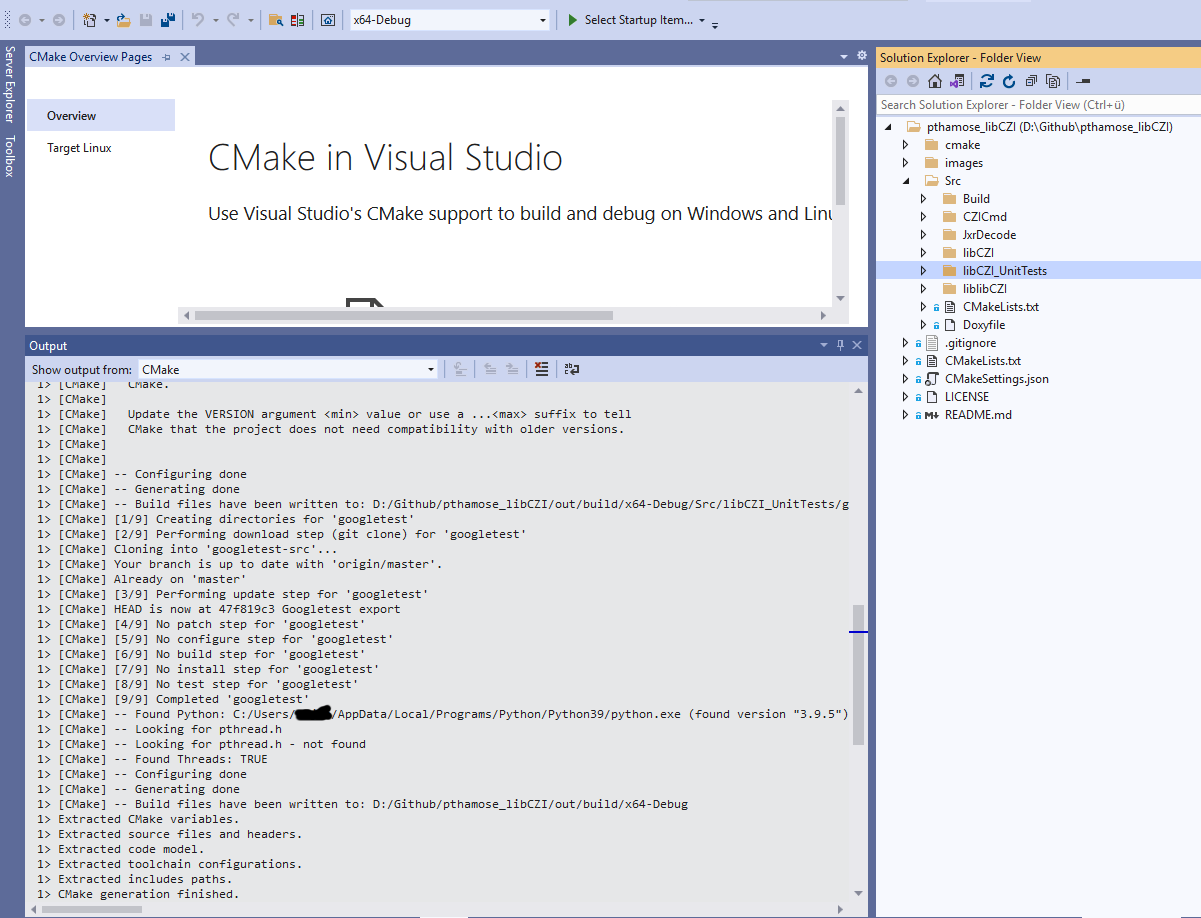
The project should compile and build without further ado.
For building on the command-line, it is recommended to do an out-of-source build. Executing those commands will execute all steps - go to the folder where the libCZI-repo is located:
mkdir build
cd build
cmake ..
cmake --build .
Building on Linux#
The same steps as above will build the code - go into the folder where the libCZI-repo is located, and run
mkdir build
cd build
cmake ..
cmake --build .
Configurations#
The CMake-file defines the following options for customizing the build:
option |
description |
|---|---|
LIBCZI_BUILD_UNITTESTS |
Whether to build the unit-tests for libCZI. Default is ON. |
LIBCZI_BUILD_CZICMD |
Whether to build the test- and sample-application CZICmd. Default is OFF. |
LIBCZI_BUILD_DYNLIB |
Whether to build the dynamic link libaray for libczi. Default is ON. |
LIBCZI_BUILD_ PREFER_EXTERNALPACKAGE_EIGEN3 |
Whether to use an existing Eigen3-library on the system (included via find_package). If this is OFF, then a copy of Eigen3 is downloaded as part of the build. Default is OFF. |
LIBCZI_BUILD_ PREFER_EXTERNALPACKAGE_ZSTD |
Whether to use an existing zstd-library on the system (included via find_package). If this is OFF, then a copy of zstd is downloaded as part of the build. Default is OFF. |
LIBCZIBUILD_CURL_BASED_STREAM |
Whether a curl-based stream object should be built (and be available in the stream factory). Default is OFF. |
LIBCZI_BUILD PREFER_EXTERNAL_PACKAGE_ LIBCURL |
Whether to use an existing libcurl-library on the system (included via find_package). If this is OFF, then a copy of libcurl is downloaded as part of the build. Default is OFF. |
LIBCZI_ BUILD_AZURESDK_BASED_STREAM |
Whether the Azure-SDK-based stream object should be built (and be available in the stream factory). Default is OFF. |
LIBCZI_BUILD_ PREFER_EXTERNALPACKAGE_ RAPIDJSON |
Prefer a RapidJSON-package present on the system. Default is ON |
LIBCZI_BUILD_LIBCZIAPI |
Build the C API bridge which can be used as foreign function interface between other languages. Default is OFF |
Experimental functionality#
Experimental functionality is disabled by default unless explicitly enabled.
The global option LIBCZI_BUILD_ENABLE_EXPERIMENTAL_FUNCTIONALITY accepts the
values AUTO, ON and OFF. AUTO is the default and keeps the
conservative build behavior.
Individual experimental features can also be controlled directly. The experimental chunked-compression feature is enabled with:
cmake .. -DLIBCZI_BUILD_EXPERIMENTAL_CHUNKED_COMPRESSION=ON
When this feature is enabled, the public configuration header defines
LIBCZI_EXPERIMENTAL_CHUNKED_COMPRESSION_AVAILABLE to 1. The feature may
also be enabled through the global experimental policy:
cmake .. -DLIBCZI_BUILD_ENABLE_EXPERIMENTAL_FUNCTIONALITY=ON
If both the global policy and the feature-specific option are supplied, the feature-specific option takes precedence. For more details about the feature and its file format, see Experimental chunked compression.
If building CZICmd is desired, then running CMake with this command line will enable building CZICmd:
cmake .. -DLIBCZI_BUILD_CZICMD=ON
Building CZICmd requires the external package RapidJSON to be available. In addition, on Linux the packages ZLIB, PNG and (optionally) Freetype are needed.
If necessary, they can be installed like this (assuming a Debian based distro):
sudo apt-get install zlib1g-dev
sudo apt-get install libpng-dev
sudo apt-get install rapidjson-dev
sudo apt-get install libfreetype6-dev
For building with a downloaded libcurl, the following packages is needed:
sudo apt-get install libssl-dev
Using vcpkg#
Alternatively, the cross-platform package-manager vcpkg can be used to build and install libCZI. For example:
vcpkg install libczi
Optional vcpkg features can be selected with the usual feature syntax:
vcpkg install "libczi[curl]"
For building libCZI itself on Windows, vcpkg can also be used to bring in dependencies such as RapidJSON and curl:
vcpkg install rapidjson 'curl[ssl]'
Experimental functionality and overlay ports#
The vcpkg registry port for libCZI is intended to provide stable, generally supported build configurations. Experimental libCZI features may be unsuitable for the registry port while their API, ABI, file format, or dependencies are still subject to change.
If you want to consume an experimental feature through vcpkg, use an overlay port. An overlay port is a local copy of a vcpkg port that takes precedence over the registry version for a single vcpkg invocation. This lets a project opt in to experimental libCZI build switches without requiring those switches to be part of the public vcpkg registry.
A typical workflow is:
mkdir -p vcpkg-overlays/ports
cp -r <vcpkg-root>/ports/libczi vcpkg-overlays/ports/libczi
Then edit the copied vcpkg-overlays/ports/libczi port to expose the desired
feature and map it to the corresponding libCZI CMake options. For experimental
chunked compression, the relevant options are:
LIBCZI_BUILD_ENABLE_EXPERIMENTAL_FUNCTIONALITY
LIBCZI_BUILD_EXPERIMENTAL_CHUNKED_COMPRESSION
LIBCZI_BUILD_PREFER_EXTERNALPACKAGE_LZ4
The overlay port should also declare the additional dependency on lz4. It
can then be used with:
vcpkg install "libczi[experimental-chunked-compression]" \
    --overlay-ports=./vcpkg-overlays/ports
Projects using overlay ports should treat the resulting binaries and CZI files as experimental and keep the overlay definition under their own version control.
Building the documentation#
Executing doxygen will produce the HTML documentation in the folder ../Src/Build folder.